TLDR: Every detour, every lesson, every fragment of knowledge sows a seed that will bloom in unexpected seasons.

“Not all those who wander are lost.” ― J.R.R. Tolkien, The Fellowship of the Ring
The Spark
Last month (August 2025), I dropped my very first blog about why I believe every developer should reinvent the wheel and build cool shit they actually find interesting. At the time, I really wanted to slap in a killer example, something that would make people go “Oh damn, that does make sense.” The problem was… my brain completely blanked. Nothing felt impactful enough. So I just decided not to add any. Fast-forward to this week, balls-deep in a pet project while still drowning in the never-ending Jira tickets, QA and PM seem to conjure out of thin air, the perfect example dropped in, as casually chaotic as a surprise billing alert on a Tuesday afternoon.
The Side Quest
The side quest? Building my own desktop UI framework in C++ with Skia, because apparently sleep is optional. Stuff works (somehow), but I keep tripping on past me’s giga-chad design choices that were clearly forged to humble future me. At some point, spamming hundreds of print logs every frame stopped feeling like debugging and more like training for when I unlock my Mangekyō Sharingan. So I decided to build a dev tool in Flutter to be able to peek into the UI tree without losing my sanity.
So the next mini side quest: apparently, I thought it’d be a great idea to build my own sort of Flutter DevTools clone… except, plot twist, my framework is in C++. Which means I now get to wrestle with the question: how do you yeet an entire UI tree across every single frame without turning it into some new form of digital waterboarding? Long story short, I did not in fact perish.
Step One: The UI
First off, let me put you in my shoes.: How would you implement something like this if you were assigned this task? Do not worry, “All Might’s here”. I’ll tell you how I tackled it.
Step one? Go for the thing that always eats up the most time — building the damn fking UI*. And let me say, using flutter_shad_ui felt like cheating on an exam with the teacher’s answer sheet. Suddenly, the “hardest part” turned into a speedrun, and once the UI was actually up and running, I could literally *see* half the finish line. The motivation boost was honestly better than what I get on payday.
Step Two: Making the Tree Loggable
Step two? How do I get my UI tree and send it across to another app? First, I have to make all the UI elements loggable, after making them all implement a class that has a toString() method. With that done, I was one step closer to unlocking my final form as a cracked dev. And then I sprinkled in some formatting, not because I had to, but purely to flex on my inner hater and remind him: I am HIM. Below is an example of what I got after
3CounterComponent {
key: "test-counter-1"
offset: { x: 0, y: 0 }
size: { w:200, h: 200 }
tappable: true
  children: [
    13TextComponent {
    key: "text-count"
    offset: { x: 50, y: 80 }
    size: { w:100, h: 30 }
    tappable: false
    text: "Count: 1"
    style: TextStyle { color: Color {r:0, g:0, b:0, a:255}, fontSize: 20, weight: Bold, decoration: none, italic: 0}
    }
    4View {
    key: "button-plus"
    offset: { x: 90, y: 120 }
    size: { w:30, h: 30 }
    tappable: true
      children: [
        13TextComponent {
        key: "plus-label"
        offset: { x: 8, y: 5 }
        size: { w:15, h: 20 }
        tappable: false
        text: "+"
        style: TextStyle { color: Color {r:255, g:255, b:255, a:255}, fontSize: 18, weight: Normal, decoration: none, italic: 0}
        }
      ]
    }
  ]
}
Step Three: JSON? Never Heard of Her
At this point, you can probably guess where I’m heading. You’re thinking: “Ohhh, that kinda looks like a tree structure with parents, nodes, children, leaves.” And if you assumed I was about to say it looks like JSON… my poor, misguided opponent, you have been thoroughly deceived. You clearly don’t know me at all. Me? Touch JSON?? Ptui. I’d rather exorcise my laptop with holy water.
Instead, I did what any self-respecting cracked dev would do: dumped the logs into a file, whipped up my own parser from scratch, turned that into an ATS tree, and then converted that into my own TreeNode. Because honestly, are you even in the cracked dev club if you’re not reinventing the wheel at every possible opportunity? That’s not insanity, my friend… that’s just basic knowledge.
The Parser Side Quest
Being able to do that was only possible thanks to a random side quest I went on last year, back when I thought it’d be a genius idea to build my own programming language. Yeah, that project is now rotting away in the great elephant graveyard known as GitHub, but at least I walked away with one shiny souvenir and gained lots of XP: I actually learned how to write a parser and do tokenization. And let me tell you, it was so f*cking cool. Probably the most fun I’ve ever had while learning something.
Type-Safe Glory
And here’s what I ended up with. Now I can traverse this thing like I own the place because, of course I do. Then spin up a proper Tree that my UI can actually use, and the best part?? It’s F*king type-safe, which makes working with it not just easier but like a warm knife cutting through butter
ObjectNode {
  name: 3CounterComponent,
  value: {
    key: test-counter-1,
    offset: ObjectNode { name: offset, value: { x: 0, y: 0 } },
    size: ObjectNode { name: size, value: { w: 200, h: 200 } },
    tappable: true,
    children: ArrayNode [
      ObjectNode {
        name: 13TextComponent,
        value: {
          key: text-count,
          offset: ObjectNode { name: offset, value: { x: 50, y: 80 } },
          size: ObjectNode { name: size, value: { w: 100, h: 30 } },
          tappable: false,
          text: Count: 1,
          style: ObjectNode {
            name: TextStyle,
            value: {
              color: ObjectNode { name: Color, value: { r: 0, g: 0, b: 0, a: 255 } },
              fontSize: 20,
              weight: Bold,
              decoration: none,
              italic: 0
            }
          }
        }
      },
      ObjectNode {
        name: 4View,
        value: {
          key: button-plus,
          offset: ObjectNode { name: offset, value: { x: 90, y: 120 } },
          size: ObjectNode { name: size, value: { w: 30, h: 30 } },
          tappable: true,
          children: ArrayNode [
            ObjectNode {
              name: 13TextComponent,
              value: {
                key: plus-label,
                offset: ObjectNode { name: offset, value: { x: 8, y: 5 } },
                size: ObjectNode { name: size, value: { w: 15, h: 20 } },
                tappable: false,
                text: +,
                style: ObjectNode {
                  name: TextStyle,
                  value: {
                    color: ObjectNode { name: Color, value: { r: 255, g: 255, b: 255, a: 255 } },
                    fontSize: 18,
                    weight: Normal,
                    decoration: none,
                    italic: 0
                  }
                }
              }
            }
          ]
        }
      }
    ]
  }
}
Step Four: Gluing It Together
Okay, so UI ✅, parser ✅. Time to glue this shit together, right? Simple: have my C++ UI framework dump to ~/.my_ui_framework_name/debug_ui.log , and the Flutter app reads it. I set that up, booted the app, ready to test… and then reality decided to set in. A desktop app can’t just rummage through system files like an African nosy auntie neighbor. You have to use a file picker every single time?? Turns out apps are sandboxed for security (who knew, kinda ashamed as a mobile dev, I knew it was a thing in mobile but didn’t expect desktop to be the same). Is there a shared path apps can use?? How do other apps and tools whisper to each other?? Is this the end of my glorious plan?? Will my OS’s iron fences defeat me? Hell no, I’m an aspiring cracked dev. If the OS won’t play nice, I’ll find a way… or at least make a very dramatic backup plan while screaming into the void.
The Walk & The Mustache Man
After getting sufficiently annoyed at my computer and life choices, I did what I always do when I hit a brick wall: I went out for an evening walk to think. And then, lightbulb moment. That wise Mustache man is always preaching about using TCP for tools he built during live streams. Normally, just hearing “TCP” would’ve had me sweating, because in my head it’s this big, scary beast more complex than a simple HTTP server.
But thanks to a way older side quest, I actually knew the secret: spinning up a TCP server is literally 3–5 lines in most languages. Keyword: most. Because in C++? Hell no no no, writing a somewhat thread-safe, non-blocking TCP server in C++ was actually hell. Okay, to be fair, I’m still relatively new to the language and just learning most stuff as it comes, but does everything have to be so hard in C++? Well, I came out at the top, even tho I did bleed a bit. A Win is a Win, regardless.
Baby’s First DevTool™
So with a TCP server running on both ends, I slapped a periodic timer on the Flutter app to ping for logs every second, and made sure the server always stayed awake in debug mode. And just like that, you’ve basically built a DevTool with me. Sure, it’s baby’s first DevTool™. But it works.
Honestly, if I hadn’t gone down all those random side quests, this whole thing would’ve been ten times harder, or worse, I’d be here begging ChatGPT for some sloppy half-baked code dump I barely understood. Instead, for the first time, all those little scraps of knowledge and XP from past detours actually clicked into one bigger picture. It may not look like much, but it’s honest work, and damn, do I love it.
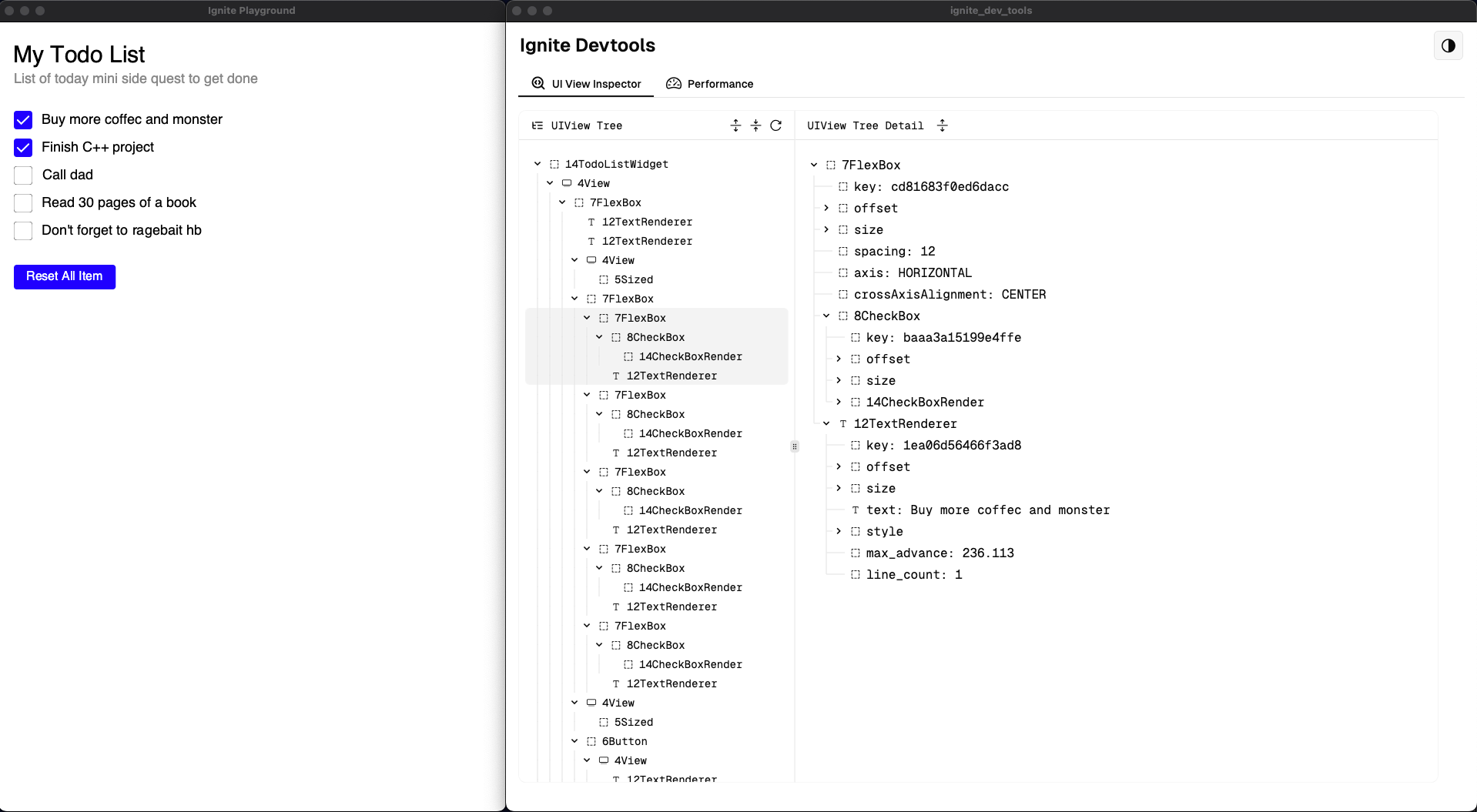
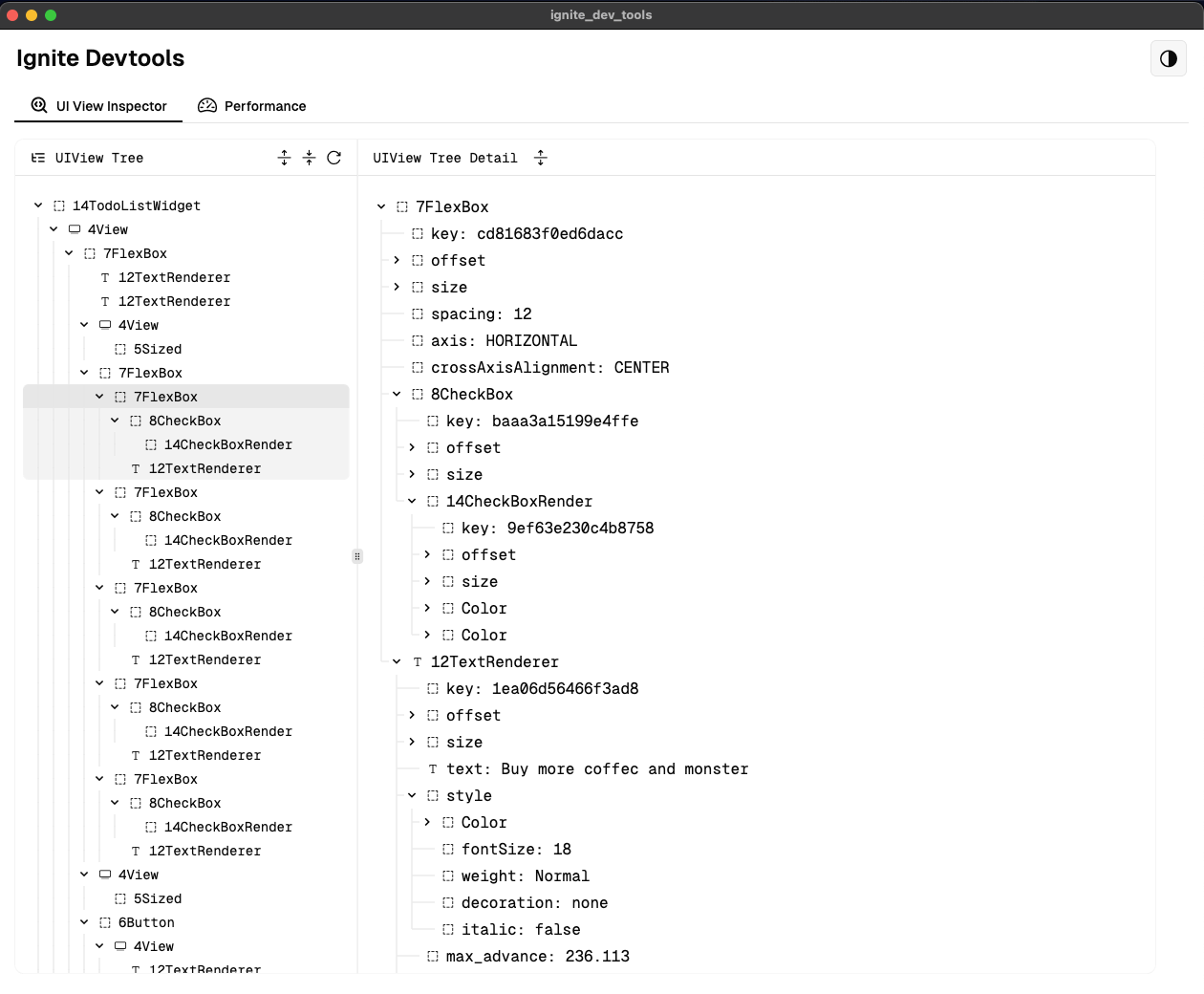
Some Screenshot for what was build
The app on the left is the UI framework and the one on the right is the dev tool
My next blog is going to be able writing a JSON parser, Stay tuned and don’t forget to “Do More Side Quests”